The file synchronization options tab provides the user with the ability to control the following advanced file synchronization options:
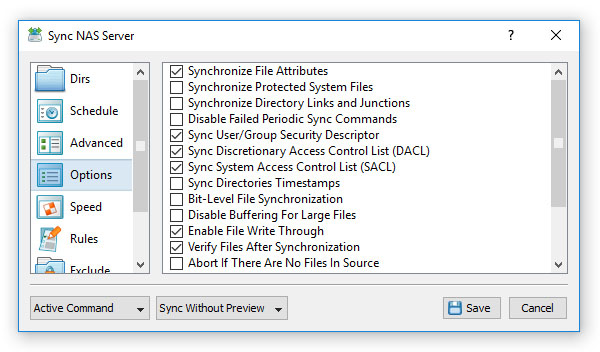
- Synchronize File Attributes - this option enables synchronization of file attributes.
- Synchronize Protected System Files - this option enables synchronization of protected system files and directories.
- Synchronize Directory Links and Junctions - this option enables synchronization of directory links and directory junctions.
- Disable Failed Periodic Sync Commands - this option provides the ability to automatically disable failed periodic file synchronization commands, which cannot be started due to network connectivity problems.
- Sync User/Group Security Descriptor - this option enables synchronization of files' ownership information.
- Sync Discretionary Access Control List (DACL) - this option enables synchronization of files' DACL access control lists.
- Sync System Access Control List (SACL) - this option enables synchronization of files' SACL access control lists.
- Sync Directories Timestamps - this option enables synchronization of directories timestamps.
- Bit-Level File Synchronization - this option enables bit-level file synchronization for the file sync command, which updates only changed data blocks for each copied file.
- Disable Buffering For Large Files - this option disables disk I/O buffering for large files when synchronizing files on a modern operating system such as Windows Server 2012 or newer.
- Enable File Write Through - this option RDMA network transfers when synchronizing files on a modern operating system such as Windows Server 2012 or newer.
- Verify Files After Synchronization - this option enables verification of each synchronized file.
- Abort If There are No Files in Source - this protection option is intended to prevent accidental deletion of files from the destination directory when the source directory is reported empty due to a network connectivity problem.
- Abort If There are No Files in Destination - this protection option is intended to prevent accidental deletion of files from the source directory when the destination directory is reported empty due to a network connectivity problem.