Depending on specific needs, it may be required to perform different types of file synchronization operations.
For example, sometimes users may be interested in keeping all files in the destination directory even when some
of them were deleted from the source directory. Another option is to perform two-way accumulation and update
keeping both directories completely identical. SyncBreeze provides a number of one-way and two-way file
synchronization modes allowing one to perform different types of file synchronization operations according
to user-specific needs and requirements.
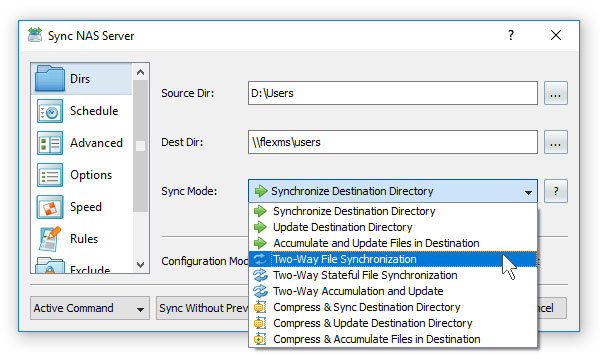
In order to change the file synchronization mode for a file synchronization command, open the file synchronization
command dialog, select the 'General' tab and select one of the following file synchronization modes:
- Synchronize Destination Directory (one-way) - All changes made in the source directory will be propagated to the destination directory. Files deleted from the source directory will be deleted from the destination directory. All files changed or deleted in the destination directory will be restored using files from the source directory. No changes will be made in the source directory. After the file synchronization process is complete both locations will be identical.
- Update Destination Directory (one-way) - Newly created and modified source files will be copied to the destination directory. Files deleted from the source directory will be deleted from the destination directory. Files deleted from the destination directory will be restored using files from the source directory. Newly modified destination files will be kept in place. No changes will be made in the source directory.
- Accumulate and Update Files in Destination (one-way) - Newly created and modified source files will be copied to the destination directory. Files deleted from the destination directory will be restored using files from the source directory. Newly created and modified destination files will be kept in place. No files will be deleted from the destination directory. No changes will be made in the source directory.
- Two-Way File Synchronization - Newly created and modified files will be synchronized in both directions. Files deleted from the source directory will be deleted from the destination directory. Files deleted from the destination directory will be restored from the source directory. Changes may be made in both locations. After the file synchronization process is complete both locations will be identical.
- Two-Way Stateful File Synchronization - Newly created and modified files will be synchronized in both directions. Files deleted from the source directory will be deleted from the destination directory. Files deleted from the destination directory will be deleted from the source directory. Changes may be made in both locations. After the file synchronization process is complete both locations will be identical.
- Two-Way Accumulation and Update - Newly created and modified files will be updated in both directions. Files deleted from one location will be restored from the second location. Changes may be made in both locations. After the file synchronization process is complete both locations will be identical.
- Compress and Sync Destination Directory (one-way) - Files changed in the source directory will be compressed and copied to the destination directory. Files deleted from the source directory will be deleted from the destination directory. All files changed or deleted in the destination directory will be restored using files from the source directory. No changes will be made in the source directory.
- Compress and Update Destination Directory (one-way) - Newly created and modified source files will be compressed and copied to the destination directory. Files deleted from the source directory will be deleted from the destination directory. Files deleted from the destination directory will be restored using files from the source directory. Newly modified destination files will be kept in place. No changes will be made in the source directory.
- Compress and Accumulate Files in Destination (one-way) - Newly created and modified source files will be compressed and copied to the destination directory. Files deleted from the destination directory will be restored using files from the source directory. Newly created and modified destination files will be kept in place. No files will be deleted from the destination directory. No changes will be made in the source directory.