SyncBreeze Logo

SyncBreeze Options Dialog

Select the 'Tools - Advanced Options' menu item to open the options dialog.
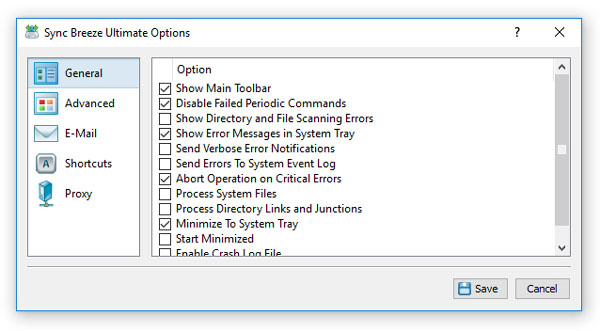
SyncBreeze Options Dialog General

The 'General' tab allows one to control the following options:

  • Show Main Toolbar - Enables/Disables the main toolbar
  • Automatically Check For Product Updates - select this option to instruct SyncBreeze to automatically check for available product updates.
  • Show Scanning Access Denied Errors - select this option to see error messages when SyncBreeze is prevented to scan files in a directory
  • Process System Files - select this option to synchronize system files.
  • Abort Operation On Critical Errors - by default SyncBreeze is trying to process as many files as possible logging non-fatal errors in a process log. Select this option to instruct SyncBreeze to abort operation when encountering a critical error.

The 'Shortcuts' tab provides the user with the ability to customize keyboard shortcuts. Click on a shortcut item to edit the currently assigned key sequence. Press the 'Default Shortcuts' button to reset all keyboard shortcuts to default values.
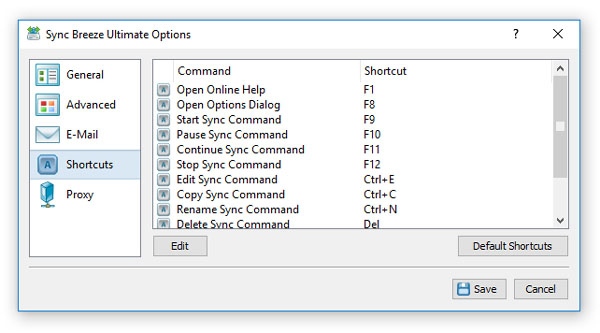
SyncBreeze Options Dialog Shortcuts

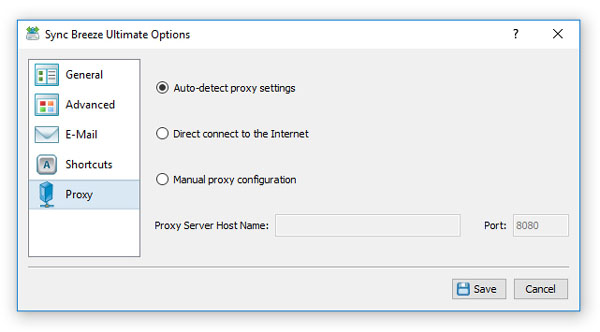
The 'Proxy' tab provides the user with the ability to configure the HTTP proxy settings. SyncBreeze uses the HTTP protocol in order to inquire whether there is a new product version available on the web site.
SyncBreeze Options Dialog Proxy

By default, SyncBreeze detects proxy settings and connects to the Internet directly or through an HTTP proxy depending on the configuration of the host computer. Depending on a specific host and network configuration, the user is provided with the ability to connect to the Internet directly, trough automatic HTTP proxy discovery or manually by entering the HTTP proxy server name and port.

SyncBreeze News

29-Sep-2026

SyncBreeze v18.3 adds the ability to load file synchronization commands from XML files allowing one to fully automate the setup and control of the file synchronization operations. In addition, the new product version improves the conditional disk space monitoring actions allowing one to send e-mail notifications when there is not enough disk space, improves the SyncBreeze Server GUI application and fixes a number of bugs.

12-Jun-2026

SyncBreeze v18.2 redesigns the file synchronization progress dialog, improves the performance of the file synchronization operations and improves the recoverable file synchronization operations. In addition, the new product version improves the main SyncBreeze GUI application, improves the SyncBreeze command line utility and fixes a number of bugs.

More News