SyncBreeze Logo

Synchronizing with Tertiary Destination Directories

Sometimes, when backing up very important information, it may be required to synchronize a single source directory with two destination directories, potentially located on different physical disks, servers or NAS storage devices. Making a third copy of important files significantly reduces the risk of losing the important information in the case that one of the backup copies will be destroyed by a catastrophic hardware failure.
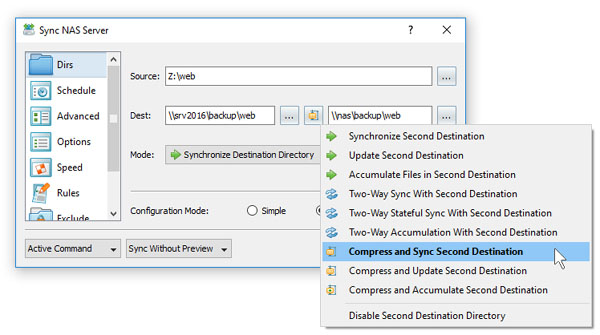
File Synchronization With Tertiary Destination Directory

SyncBreeze Pro and SyncBreeze Server allow one to define a tertiary destination directory for any file synchronization command. In order to configure a tertiary destination directory, open the file sync command dialog, select the 'General' tab, select the 'Extended' configuration mode and specify a tertiary destination directory. During runtime, SyncBreeze will first synchronize the source directory with the first destination directory and after that with the tertiary destination directory.

SyncBreeze News

29-Sep-2026

SyncBreeze v18.3 adds the ability to load file synchronization commands from XML files allowing one to fully automate the setup and control of the file synchronization operations. In addition, the new product version improves the conditional disk space monitoring actions allowing one to send e-mail notifications when there is not enough disk space, improves the SyncBreeze Server GUI application and fixes a number of bugs.

12-Jun-2026

SyncBreeze v18.2 redesigns the file synchronization progress dialog, improves the performance of the file synchronization operations and improves the recoverable file synchronization operations. In addition, the new product version improves the main SyncBreeze GUI application, improves the SyncBreeze command line utility and fixes a number of bugs.

More News