|
|
|
|
SyncBreeze Server Exclude Directories and Files
SyncBreeze Server allows one to exclude directories or files from the file synchronization process. In the simplest case, in order to exclude a subdirectory from a file synchronization command, open the file synchronization command dialog, select the 'Exclude' tab and add one or more subdirectories to the exclude list. 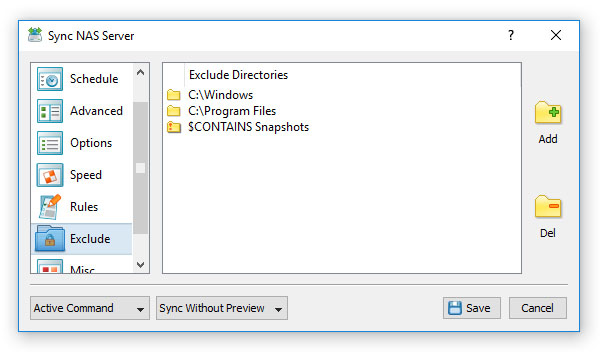
During the file synchronization process, SyncBreeze will skip all directories specified in the exclude list including all subdirectories and files located in these directories. In addition, advanced users are provided with a number of exclude directories macro commands allowing one to exclude multiple directories using a single macro command. SyncBreeze Server provides the following exclude directories macro commands:
For example, the exclude macro command '$CONTAINS Temporary Files' will exclude all directories with 'Temporary Files' at any place in the full directory path and the exclude macro command '$REGEX \.(TMP|TEMP)$' will exclude all directories ending with '.TMP' or '.TEMP'. Excluding Files Using Negative Rules Another option is to exclude files using negative file matching rules. For example, in order to exclude all temporary files with the 'TMP' or 'TEMP' file extensions, add a file matching rule configured to match files with extensions different from 'TMP' and 'TEMP'. 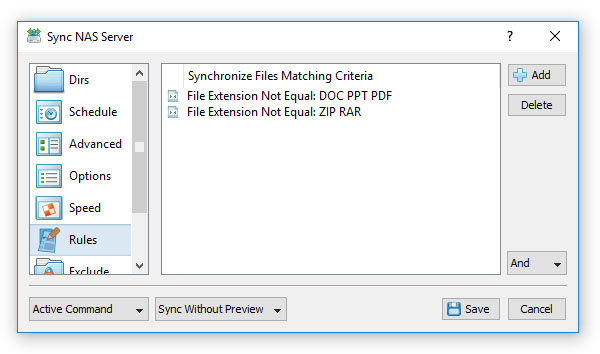
In order to add one or more exclude file matching rules, open the file synchronization command dialog, select the 'Rules' tab, add an appropriate rule, select a negative file matching operator and specify all the required parameters.
|
SyncBreeze News
|