SyncBreeze Enterprise provides the ability to set a priority for each file synchronization command allowing one to dynamically slow down or
pause low priority file synchronization operations when a high priority sync command should be performed. In order to assign a priority to
a file synchronization command, open the command options dialog, select the 'Advanced' tab, select an appropriate file sync priority
and press the 'Save' button.
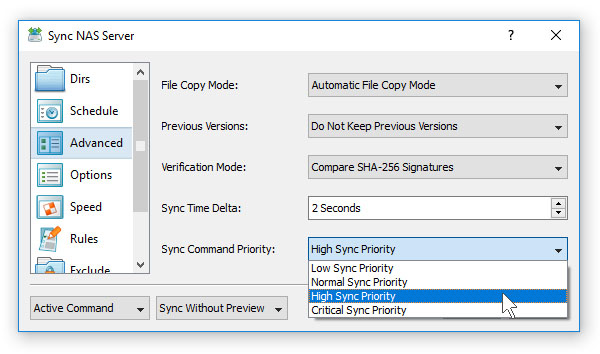
Each file synchronization command may be assigned one of the following file sync priorities:
- Low Sync Priority - low priority file synchronization commands are dynamically paused when one or more higher priority file sync commands are running and automatically resumed after higher priority sync commands completed.
- Normal Sync Priority - normal priority file synchronization commands are dynamically slowed down when one or more high-priority commands are running and automatically restored to the default speed after high priority sync commands completed. In addition, a normal priority sync command will dynamically pause all low priority file sync commands.
- High Sync Priority - a high priority file sync command will dynamically pause all low priority file sync commands. In addition, a high priority sync command will dynamically slow down all normal priority sync commands.
- Critical Sync Priority - a critical priority file sync command will dynamically pause all other sync commands and automatically resume all paused sync commands after the critical priority file sync command completed.
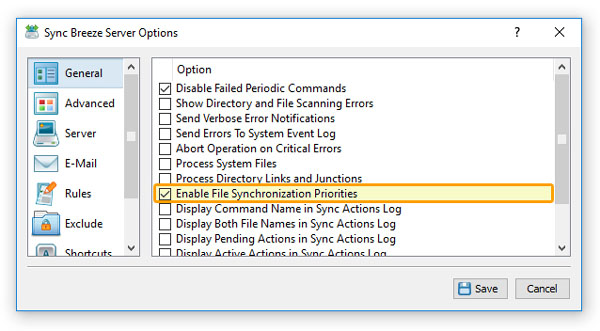
By default, dynamic sync priorities are disabled and in order to enable these capabilities, the user needs to open the main 'Options' dialog, select the 'General' tab and select
the 'Enable File Synchronization Priorities' option.